

There’s a saying in college: Friends, Sleep, Grades. Pick two. That’s a fallacy. It should be: Friends, Sleep, Gym, Grades, wasting time on your computer and your phone doing things that don’t help you grow but feel good in the moment. As long as you don’t let that last one bleed into your other categories you unlock a ton of time.
When I started college I used facebook too much and it was really hard for me to get myself to stop — insert whatever it is for you: instagram, snapchat, twitter, soundcloud, etc.. When I would sit to do my work I would keep opening facebook or YouTube instead of focusing. I tried a bunch of different tactics that didn’t work to stop myself from waisting all that time. I also had a really tough time getting myself to go to sleep on-time, often due to not being able to close YouTube or social media.
I faced one huge issue. Facebook and Instagram are actually EXTREMELY useful. Quitting cold turkey could work but I would also be missing out on so much. So I tried and sometimes invented a bunch of different tactics to solve my problem and modify social media to give myself all of the upside and none of the downside. And it ended up working. Really well. Below is the assortment of tools and strategies I ended up sticking with.
Software Tools:
Facebook News Feed Eradicator.google.com/webstore/detail/news-feed-eradicator-for/fjcldmjmjhkklehbacihaiopjklihlgg?hl=en) — a chrome extension that removes your facebook newsfeed, so you don’t waste time on it. This is a Game Changer. Download it right now for chrome.
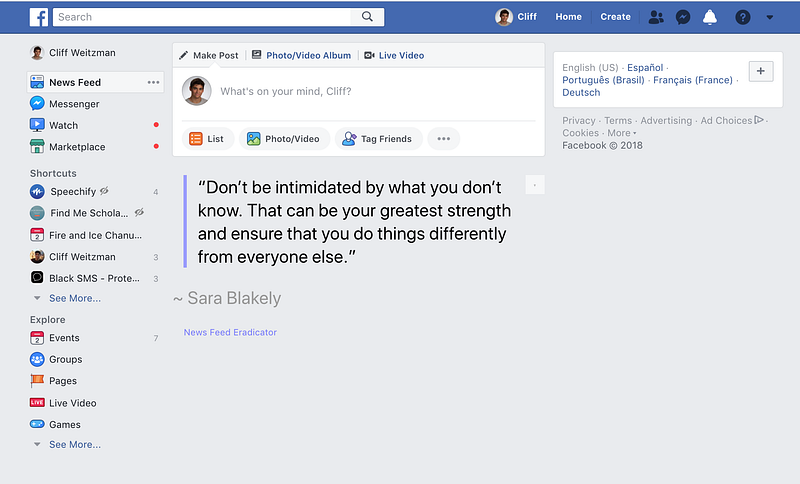
Use Adblock Like a Pro — In addition to removing ads from YouTube, Facebook, and other sites, AdBlock has a power user mode that let’s you pick ANY HTML content and have it blocked. In the video below I show how to remove the home page suggestions and side bar suggestions in YouTube using AdBlocks power user mode.
I cannot stress how powerful this feature is.On YouTube I use it to:- Remove all the suggestions on the home page and the side bar. - Block the suggestions that appear on the video screen at the end of a video - AND I use it to REMOVE THE THUMBNAILS OF VIDEOS. Never be click-baited again.
Now, you can use only your logical brain (instead of your easily provoked visual cortex) to decide which videos to click on and you only get the videos you specifically searched for. Nothing more.
On Facebook I use this to remove the side screen suggestions (especially for videos). If you want to use AdBlock in exactly the same way I do just post this into the power editor on AdBlock as shown in the video:
www.facebook.com##DIV[class="home_right_column"]www.facebook.com##A[id="js_5z"][class="jewelButton _3eo9"][name=”notifications”]www.facebook.com##DIV[class="_1bn5"] www.youtube.com##DIV[id="yt-banner-promo-renderer-background"][class="feed-item-dismissable yt-banner-promo-renderer-type-style-big”]www.youtube.com##YTD-WATCH-NEXT-SECONDARY-RESULTS-RENDERER[class="style-scope ytd-watch”]www.youtube.com##DIV[class="ytp-endscreen-content"]www.youtube.com##DIV[class="html5-endscreen ytp-player-content videowall-endscreen ytp-show-tiles”]www.youtube.com##DIV[class="ytp-upnext ytp-suggestion-set”]www.youtube.com##DIV[id="movie_player"][class="html5-video-player ytp-hide-info-bar ytp-iv-drawer-enabled iv-module-loaded ended-mode”]www.youtube.com##DIV[id="meta"][class="style-scope ytd-grid-video-renderer”]www.youtube.com##DIV[id="items"][class="style-scope ytd-watch-next-secondary-results-renderer”]
To remove sponsored ads on google include this:www.google.com##LI[class="ads-ad"] To also remove thumbnails on YouTube include this:www.youtube.com##[id="thumbnail"] To remove the red notification icon from fb also add this:www.facebook.com##SPAN[id="notificationsCountValue"][class="_51lp _3z_5 _5ugh”]
[Feedless](https://itunes.apple.com/us/app/feedless-newsfeed-blocker/id1339509325?mt=8) — Removes the timeline from facebook, instagram, and twitter in the browser ON YOUR IPHONE! I’ve searched for a product like this for years, so I’m really happy my friend Ryan Orbuch went ahead and built it. [Feedless](https://itunes.apple.com/us/app/feedless-newsfeed-blocker/id1339509325?mt=8) handles facebook for free, and charges $0.99/mo to remove the newsfeed from Instagram. Which means that if it saves you an hour of mindless scrolling per year it will have paid for itself many times over. Do you really want to solve your procrastination problem? So pay the $12/yr, it’s worth it. (I’m not paid to recommend this, I just know it’s awesome).Download [Feedless](https://itunes.apple.com/us/app/feedless-newsfeed-blocker/id1339509325?mt=8).
Using solutions like Feedless and News Feed Eradicator make this system work. Since you are not quitting cold turkey but simply editing how the platforms appear on your screen it is much less likely that you’ll give in and download the apps again. Given how locked down the iPhone is by Apple, there is no way of modifying or even blocking a user from using the Facebook or Instagram apps once those apps are on the phone (there is a way to limit Snapchat, Freedom, discussed below). So, for this to work, you have to vow to yourself to keep the fb app completely off your phone. And that should be possible bc everything you can do on the fb app your can do using fb on the browser.
It’s harder not to re-download the Instagram app because there is functionality there you can’t use from the browser. For this issue I recommend:
Direct Message for Instagram — which is a Mac app that lets you use the messaging system from Instagram on your computer. It’s $3 that are totally worth it.
On the same vain, I highly recommend:https://messenger.com and the Messenger App for Facebook for allowing you to have conversations without being distracted.
Another tool I’m really excited about is:
Freedom — which allows you to allows you to properly lock down any website or app from running on your computer. It costs $30 a year and it is by far the best of it’s kind I’ve found. I use it to disable social media from 1am — 5am every day on my phone and computer. It also lets you you click one button to disable all unwanted websites on your phone and your computer for a set period immediately. Freedom is a little bit more complicated to setup so I included a deeper dive into how to do that in the bottom of this post.
Speechify — Using Speechify you can take anything you need to read for school and send it to your iPhone. Now you can take that 60 page reading you need to do for History/English/Econ/Philosophy and finish it while working out, driving, walking to class, cleaning your room, or eating/making dinner. You can also use this to re-listen to material before an exam. You can import PDFs into Speechify from Google Drive, Dropbox or iCloud, copy text into it that is on your iPhone’s clipboard, import articles from Safari, or take photos of any physical text that appears in your textbook or handout and Speechify will read that out to you as well using a high quality AI generated voice at up to 900 words per minute.
Speechify Desktop Take any PDF, Website or digital textbook and either highlight the words + click play, or drag the material into the Speechify Mac app, and it will read it to you on your computer. The amazing thing for procrastination here is that when a voice is reading to you, at the speed that you set, and it’s highlighting the word on the screen as it is reading, it is extremely difficult to get distracted. Effectively you are on rails: You don’t need to expend much energy, even if you do look away the voice keeps going, and when you look back at the screen you can see exactly where the voice is because it’s highlighting every word as it goes so you can’t loose your spot.
Speechify is ESPECIALLY good on iPad. If you have a PC computer you can use the Speechify chrome extension, if you have an Android you can try out the beta Android version Updates (coming soon).
Here is a funny skit we made about this that’s actually pretty informative
Speechify is the single most important tool I had at my disposal throughout college and after. A totally unfair advantage. I built the early version for this freshman year and have been refining it ever since — I now work on Speechify full time with a bunch of good friends. It’s also free! So use it as much as you want, tell your friends about it, post about it, and let me know how it was useful for you and what we can do to make it even better.
Behavior Changes
The first thing I did when I decided I was going to go beast mode on not procrastinating was to delete Facebook, Instagram, Snapchat, YouTube and Twitter from my phone. It’s essential to do this, but it’s also easy to re-download the apps. So here is the next thing I did that was key:
I reset my password on facebook and instagram to something insanely long and complicated. I’m talking something that has 40+ characters, multiple special characters like “@, $,%,” and that was comprised of mainly one time of me randomly hitting keys on my keyboard like a monkey. Then I took that password I created that no one could memorize and gave it to a good friend, made sure he kept it someplace safe, and didn’t keep a copy of it myself. So, now I can be logged in on my desktop and on Safari on my phone but not on the fb app itself.
The friend I picked was not my roommate. I picked a friend that lived on the floor underneath me, so if I ever wanted him to log in for me, I’d have to text him, walk downstairs and give him my phone or computer to log me in. (I could have also chosen my sister or mom who lived far away and called them on the phone every time I needed to be logged back in).
If ever I needed my friend to log me back in I would have him do it in person (I never wanted to be faced with the challenge of having a copy of this password on my phone) and as soon as I was done with whatever I needed to be logged in for I would LOG OUT.
I used this system for 6 months and that reset me. I recommend starting like this — hard core. And then stepping to something more mild next. For me more mild meant keeping a new crazy password that I could not remember someplace else that was safe. So, whenever I needed to login-in for some reason I would have to look it up and then type it in, but I could do that without bothering my friend. this being said the first 6 month period is essential for helping you build good habits.
Using this system, I could use modified facebook and instagram on my phones browser and my computer’s browser. I made sure to never download the Facebook iPhone app again and even if I did, I didn’t have the password to log in with unless someone typed it in for me. I also used AdBlock Power User Mode to eliminate distractions on YouTube.
Your Time is Valuable
It is important to remember that your time is valuable.
Freedom
Freedom — Disable social media from 1am — 5am every day on your phone and your computer. This is the only tool I’ve found that does a good enough job of making sure it’s hard to get around (I’m really impressed with the development team for this).
Freedom also let’s you click one button to disable all unwanted websites on your phone and your computer for a set period of time in the moment.
**There are some free apps similar to Freedom but none of them are as good. It’s easy to get around all of them. Freedom is more sophisticated. Some Freedom features you can get for free but the pro version of Freedom costs $30/year. You want the pro version. Depending on when you read this you may also be able to use this coupon code “CYBER30” to get it for $21. (I’m not paid to recommend this, I just know it’s awesome).
Here is how to set it up: 1. Download freedom on to your Desktop and your Phone it works for Mac, PC, iPhone, and Android. Do it now. Seriously, stop everything, first download it, then come back and continue reading it should take 1 minute.
Did you do it? Good. Let’s move on :)
- Use your email as your username and any password as your password and login across all your devices.
- Open the Dashboard link: https://freedom.to/dashboard while you are logged in and do the following:
- - Confirm that all your devices show up on the left side of the screen under devices, if not add them and make sure they are checked.
- - Make a new Blocklist, name it whatever you want, and include in it all the things you want to block. Think of anything that could distract you and keep your from studying or going to bed and check that category. You can add your own custom websites. Then click save.
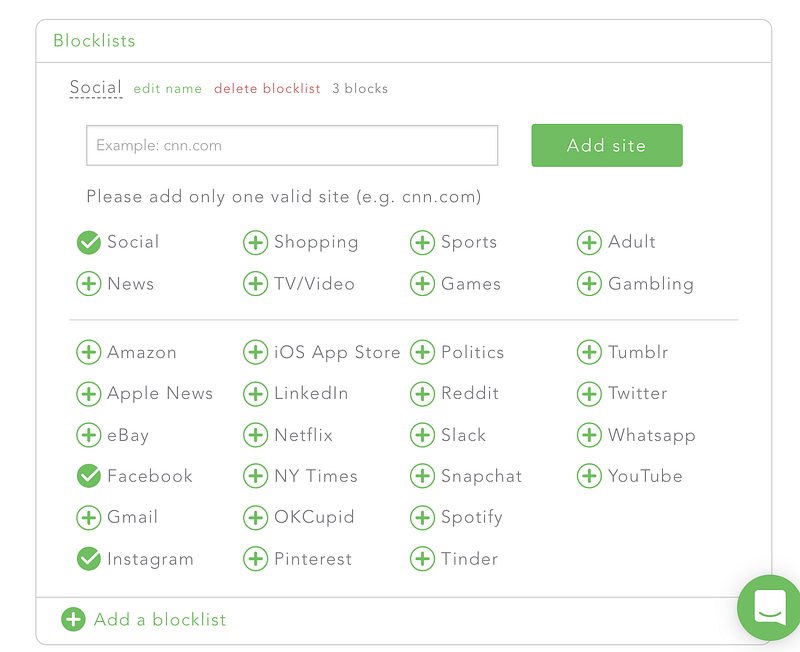 - Click the Recurring session tab at the top
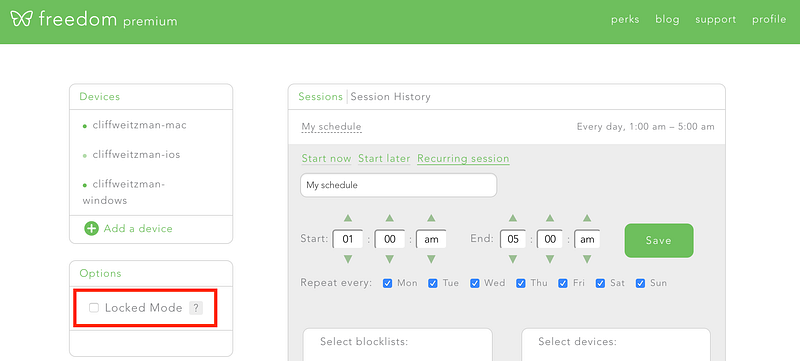
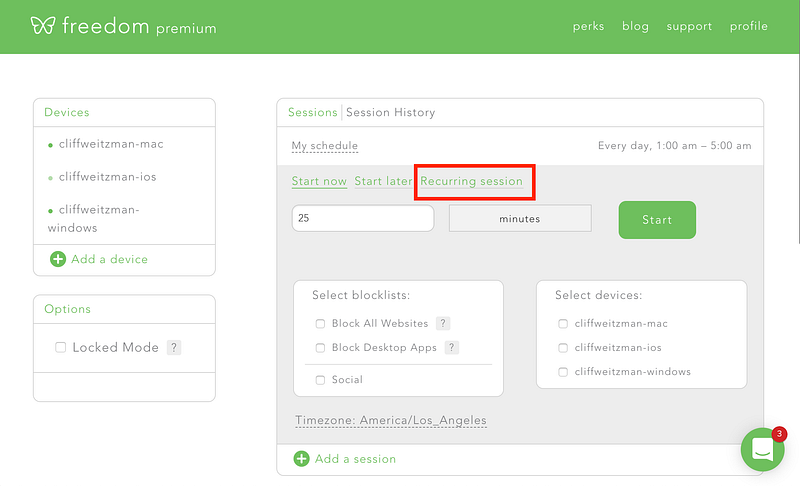 - Then:1. Set the time for having all social media blocked on your phone and computer to be between 1am and 5am (or whatever times are best for you).2. Set this schedule to apply every day.3. Make sure this schedule is applied to all your devices4. And make sure to check the block list you made before, in my case it’s called Social.5. Save

- In the bottom left check Lock Mode
- Now, on your computer, open Freedom from your toolbar, click options and then check Start at Login, Disable Quit During Sessions, and Disable Acivity Monitor During Sessions. (If you have too many applications on your toolbar and you can’t find Freedom open an app that is not Chrome and then try to do this).
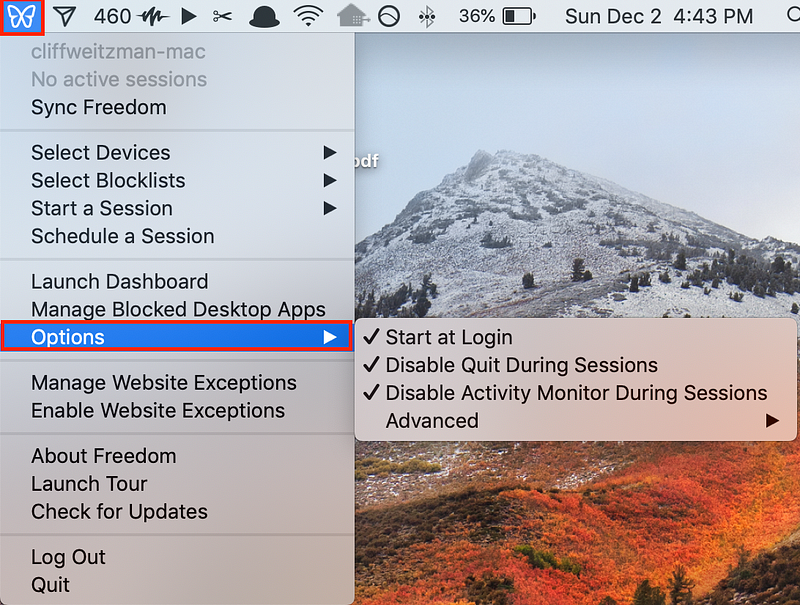
- VERY IMPORTANT. After doing all this and setting up your session in your browser open the freedom app on your computer’s toolbar and click “Sync Freedom” it’s the top most button i the menu (if you don’t do this, the changes you made in the dashboard won’t be applied to your computer).
For more support here is a video walkthrough on how to install Freedom on Mac, iPhone, and PC:
Delete Safari
If you want to be really hardcore you can take an extreme step and for 1 week delete Safari from your phone:
Go to Settings — screen time — content and privacy restrictions — allowed apps. Doing this was critical for me for re-setting the urge to keep checking fb and IG (I don’t keep the fb and IG apps on my phone).
STOP! I just need to check. Did you download Facebook News Feed Eradicator already? If not, do it now.
Social media and websites like YouTube and Reddit are amazingly useful when you go into them with the intention to Create, or when you want to search for one specific thing and then immediately duck out. But if you get captured and sucked into a news feed, or a discover page, only to re-emerge 2 hours later, thats when you loose. The ideal scenario you want is for you to open Facebook, LinkedIn, Instagram, YouTube, etc. and for there to be nothing on that page but a search bar. When you search it gives you exactly what you are looking for, and then it does not give you any other suggestions that could suck you in. This Chrome Extension changed my life and it can change yours too. The great thing is that now when I go on facebook to see what’s new with my brother I just go to his profile and see what’s up with him. If I want a longer mental brake I think of specific friends and go to their profiles and I check my notifications. But that’s it, I can’t endlessly scroll. So after a few minutes — when I’ve gotten my fill, I’m done and can move on. For the same reason the AdBlock trick for YouTube is critical.
iPhone Hacks
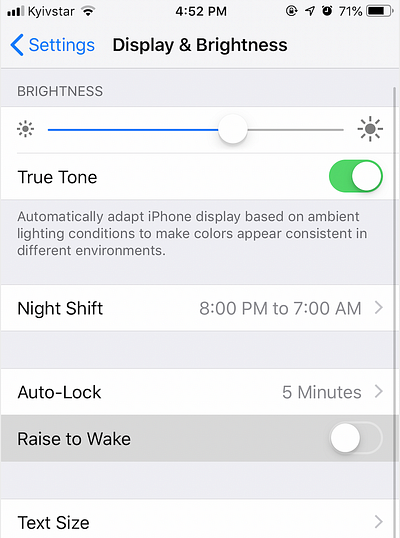
Disable Raise to Wake on iPhone so your screen only opens when you click, not whenever you move your phone. Winners check their phone when they choose. To do this, go to Settings on iPhone, search “Raise to Wake” then turn it off.

Remove The Red Notification Badge From Every App on Your Phone
Another great hack is to go into your notifications center in your iPhone. Then one by one remove the red notification badge from every app on your phone so that they never tempt you to click the app.
Sleep
The biggest behavior I’ve had a challenge changing is sleep. I just don’t want to go to bed. There are so many interesting things happening that closing my eyes just does not seem appealing to me what so ever. At the same time, I always want to wake up early. Realistically, the hours after midnight are almost never productive but no matter how much will power I employed I could not get myself to get off my computer or put my phone down. So I removed the choice.
I got a timer lock and a safe that was big enough to fit my laptop. Then every day before going in the shower at night, I’d lock my laptop in the safe and the key from the safe in the timer lock alongside my phone. I then set the timer lock to only open at 6am. Boom, now I can’t be distracted by my computer or my phone and it’s time to go to bed, and I’ve locked away my distractions so I have to go to sleep.
If a safe is too expensive you can get a $7 luggage lock like [this one](https://www.amazon.com/Honbay-Padlock-Suitcases-Backpacks-Lockers/dp/B078YP9JY1/ref=pd_sim_198_3?_encoding=UTF8&pd_rd_i=B078YP9JY1&pd_rd_r=8988323e-18a7-11e9-8412-3d178c75a502&pd_rd_w=VqLiW&pd_rd_wg=NXgoX&pf_rd_p=18bb0b78-4200-49b9-ac91-f141d61a1780&pf_rd_r=A1BPEJCSVTZ9QM8KF95H&psc=1&refRID=A1BPEJCSVTZ9QM8KF95H) and lock your laptop in the large compartment of your backpack.While my phone was in the timer lock I used this charging cube to charge it.
In addition, I got one of these flip score boards and kept track of how many days in a row I went to sleep by midnight. My goal was to do 30 days in a row and I would not stop until I hit 30. If I missed a day I would have to restart at the beginning. So the motivation to not miss one day was really high.
In addition I posted a photo of the flipboard with which day of the challenge it is and what the challenge was to my facebook messenger story every day when I took my phone out of the lock box and asked friends to call me out if they noticed me not posting.
Finally, I also got a nice small FitBit bracelet to track my sleep more accurately. What gets measured, gets managed.
This process helped a lot in re-setting my sleep.
Philosophical Mindsets to Understand:
The most powerful thing you can do to be productive is to go in the right direction, then it’s working really hard and not being distracted. Make sure you are going in the right direction.
Meditation
The topic I want to close with is meditation. Meditation is like working out for your brain instead of your arms. Your brain is a muscle, and one of the things it needs to do is to focus. It’s easy to be constantly engaged. It’s hard to be focused on one thing while seemingly “under-stimulated”.
I’m really good at picking up and keeping good habits. This is the one that so far has still gotten away from me. Every time I try I stick with meditation for a week and then I fall off the wagon.
One of the best tips for meditation I’ve received was from an old inmate in a prison I volunteered at. “If you can’t do it for 10 minutes do it for 5. If you can’t stick with 5 do 3. If 3 is too hard to stick with do 1 minute. But just keep the practice. Be proud of that 1 minute.” It’s like running a mile. It’s ok to run slow, just don’t walk.
One of the best ways to improve on your ability to focus is to practice. And how can you practice focusing? Practice meditating. I haven’t figured out how to stick with meditation myself yet but I have many friends who I admire who swear by it. Thus, I’m not going to write a meditation how to guide, but when I do figure it out, I will.
Right now I’m writing a book about Dyslexia and ADD. I post 500 words of it online every day. If you want to follow along with me, checkout my first post here.
Cliff Weitzman is the founder of Speechify, a free productivity software that lets’ you listen to any reading 3x faster than most people read (iOS, Mac, Chrome, Android). He is featured on the Forbes 30 Under 30 List, Studied Renewable Energy At Brown University, and his signature move is a backflip ;) The best way to keep up with him is to follow him on facebook here.
Don’t know what to read next? Checkout my Favorite Books Here, My Top Productivity Tools Here, My Top Entrepreneurship Resources To Learn Here, Or better YET! Checkout this VIDEO of how I built 36 products in college.
Thanks for reading! :) If you enjoyed this article, hold the clap 👏 button for a couple of seconds to show it some love. This way, more people will be able to find and benefit from these articles.